Note: I have taken Superstore sample data for this post.
How to create dynamic dates for current, Prior, last 4 quarter, last 2 Fiscal year and last 12 months in Tableau
- Create a parameter field based on your Date field.

Used Order Date column from superstore orders table as input for this parameter and use the parameter display format as “mmm-yy”.
2. Create Current Period Logic calculated field.
[Order Date]=[Input Parameter]
3. Create Prior Period Logic calculated field.
month([Order Date])=month(dateadd(‘month’,-1,[Input Parameter]))
and Year([Order Date])=Year(dateadd(‘month’,-1,[Input Parameter]))
4. Create Previous 4 Quarter from Previous period
Month([Order Date]) in (3,6,9,12)
and date(datetrunc(‘month’,[Order Date]))>date(datetrunc(‘month’,dateadd(‘month’,-15,[Input Parameter])))
and date(datetrunc(‘month’,[Order Date]))<=date(datetrunc(‘month’,dateadd(‘month’,-12,[Input Parameter])))
5. Create Last 2 Fiscal Year calculated field
If [Order Date]=
(if [Order Date]<=[Input Parameter] and datepart(‘month’,[Order Date])=3 and [Order Date]>= dateadd(‘year’,-3,[Input Parameter])
then [Order Date] end)
then ‘TRUE’
else ‘FALSE’
END
6. Finally create a Dynamic Date calculated field for current, previous, last 4 quarter from previous and last 2 fiscal year calculation.
If ((datediff(‘month’,[Order Date],[Input Parameter])<12 and datepart(‘month’,[Order Date])=3
and [Order Date]<=[Input Parameter])
Or (datediff(‘month’,[Order Date],[Input Parameter])<12 and datepart(‘month’,[Order Date])=6
and [Order Date]<=[Input Parameter])
Or (datediff(‘month’,[Order Date],[Input Parameter])<12 and datepart(‘month’,[Order Date])=9
and [Order Date]<=[Input Parameter])
or (datediff(‘month’,[Order Date],[Input Parameter])<12 and datepart(‘month’,[Order Date])=12
and [Order Date]<=[Input Parameter]))
then [Order Date]
Elseif [Previous 4 Quarter]=TRUE then [Order Date]
elseif [Last 2 Fiscal year]=’TRUE’ then [Order Date]
elseif [Prior Period Logic]=TRUE then [Order Date]
elseif [Current Period Logic]=TRUE then [Order Date]
END
Using the above dynamic date I have created a superstore sales report to show only for current, previous, last 4 quarter from previous and last 2 fiscal year. This date will change based on you input parameter selection.

8. Similarly, you can create last 13 months or any number of months dynamic date calculation in tableau.
[Order Date]>=(datetrunc(‘month’,dateadd(‘month’,-12,[Input Parameter])))
and [Order Date]<=[Input Parameter]
9. Based on the above last 13 months date filter the report / data will show last 13 months data depending on the date selected in the input parameter.
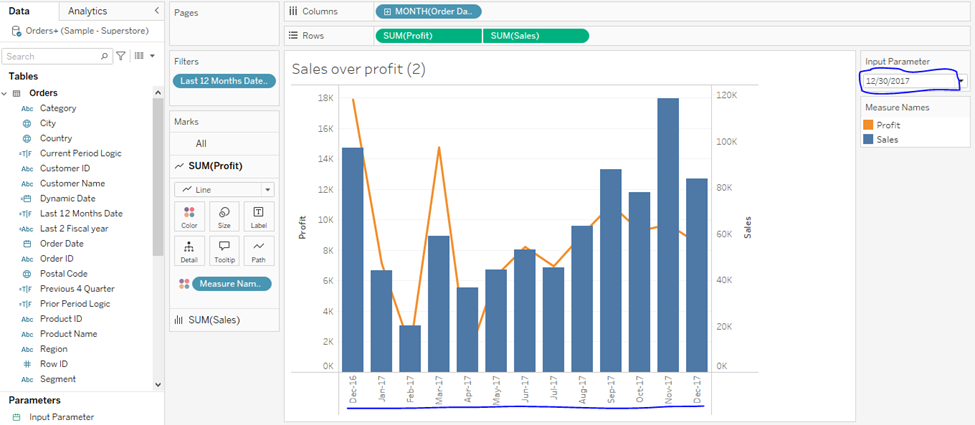
Like wise you can create whatever the date filter you needed for your requirement and apply the same in your dashboard. Feel free add yours comments and feedback on the same.
 DWBI castle